
sooksook-E-learning
Affiliate module 19 Sections170 LessonsDurée de vie
Détails
- 19 Sections
- 170 Lessons
- Durée de vie
- Introduction2 Items
- histoire4 Items
- Pourquoi?3 Items
- Nos valeurs8 Items
- Boutique SHOP.SOOKSOOK.FR8 Items
- Méthode de travail10 Items
- 6.1MUTUALISATION ET PARTAGE DES STANDARDS ET DES BONNES PRATIQUES
- 6.2Méthode de travail sooksook.fr qrcode secours
- 6.3Pourquoi 1h max ?
- 6.4Démarrage intervention
- 6.5cadenas qrcode
- 6.6Porte document verrouillable
- 6.7Moment sécurité et standard avant intervention
- 6.8Importance des rapports
- 6.9Importance des dates
- 6.10Valeur ajoutée au travail effectué
- ERP envoi sur serveur SFTP20 Items
- 7.1Automatisation de l’intégration ERP
- 7.2Pourquoi automatiser l’intégration ERP
- 7.3Rôle de SOOKSOOK dans l’architecture
- 7.4Sources des données à intégrer
- 7.5Objets métiers pouvant être envoyés vers l’ERP
- 7.6Principe général du flux automatisé
- 7.7Conditions de déclenchement de l’intégration
- 7.8Gestion des utilisateurs autorisés
- 7.9Création d’avis par messagerie
- 7.10Principe du mot clé commun
- 7.11Page de programmation XML
- 7.12Construction du XML par glisser-déposer
- 7.13Nommage des balises XML
- 7.14Paramétrage avancé du XML
- 7.15Données pouvant entrer dans le XML
- 7.16Génération automatique du XML
- 7.17Génération automatique du XML
- 7.18Gestion des pièces jointes
- 7.19Key user
- 7.20Parametrage serveur
- Fonctionnalités SOOKSOOK.FR32 Items
- 8.1Onglet : QRCode
- 8.2Onglet : Activité
- 8.3Onglet : Groupes
- 8.4Onglet : Evenement
- 8.5Onglet : Document
- 8.6Mes publications
- 8.7Métier – Competence
- 8.8Onglet : Exposition risque danger epi
- 8.9Onglet : Exposition machine
- 8.10Barre footer SOOKSOOK
- 8.11Abonnenment : suivre cet auteur
- 8.12Bouton me contacter
- 8.13Profil – Info
- 8.14Info supplémentaire
- 8.15Subscribe / Abonné
- 8.16Publipostage
- 8.17A faire – En cours
- 8.18Messagerie
- 8.19Gr/co économisé
- 8.20Badge Elearning
- 8.21Avatar et photo de couverture
- 8.22Widjet
- 8.23Description
- 8.24Statut machine appareil equipement
- 8.25Page d’avis : note : appréciation /commentaire
- 8.26Page Favoris
- 8.27Barre header SOOKSOOK
- 8.28Paramètres du compte : E-mail & Mot de passe Notifications Confidentialité du compte
- 8.29Creation d’avis et mots clé profil
- 8.30Affichage QRCODE
- 8.31Publication
- 8.32Notification
- Formulaire de publication14 Items
- 9.1CAS D’UTILISATION : LA CRÉATION DES PUBLICATIONS PAR CHOIX ET L’UTILISATION DES FORMULAIRES
- 9.2Formulaire de publication
- 9.3Formulaire de publication : Audit-Prévention-Standard -Sécurité
- 9.4Formulaire de publication : Rapport
- 9.5Formulaire de publication : Zone – Espace – Locaux
- 9.6Categorie
- 9.7Event date
- 9.8Secteur d’actvité
- 9.9Risques-Dangers
- 9.10EPI
- 9.11Outils
- 9.12Media
- 9.13Localisation- Geolocalisation
- 9.14Validation pour publication
- Utilisation10 Items
- 10.1Cas d’utilisation
- 10.2CAS D’UTILISATION : APPAREIL / ÉQUIPEMENT / MACHINE / ZONE IDENTIFIÉE
- 10.3CAS D’UTILISATION : AGENT / UTILISATEUR
- 10.4ERP
- 10.5formulaire agents
- 10.6Formulaire : appareil equipement machine
- 10.7Creation arborescence – Cartographie technique interactive
- 10.8Documentation – Archivage
- 10.9Activation et première utilisation
- 10.10CAS D’UTILISATION GROUPES / EQUIPES
- IOT5 Items
- Supervision8 Items
- Plateforme E-learning : tdataq.sooksook.fr18 Items
- 13.1E-learning connecté aux formulaires terrain
- 13.2Une bibliothèque complète
- 13.3Librairie Sécurité & Prévention
- 13.4Exemple concret : Moment Sécurité
- 13.5Librarie métier
- 13.6Relation entre T-DATAQ E-Learning et SOOKSOOK
- 13.7Lien direct avec les thématiques
- 13.8Barre footer
- 13.9Catalogue des E-learning – T-DATAQ
- 13.10Pourquoi limiter à 1 E-learning par jour ?
- 13.11Défis & Challenges
- 13.12Récompenses : transformer l’engagement en valeur réelle
- 13.13Compte & Profil utilisateur – T-DATAQ
- 13.14La boutique T-DATAQ
- 13.15Accès libre à la librairie T-DATAQ
- 13.16Catégories
- 13.17Historique et Cours suivi
- 13.18Réglages
- Retribution1 Item
- Avantage / Gain12 Items
- 15.1Synergie équipe
- 15.2Analyse 5S
- 15.3Gain de Temps
- 15.4Entreprise utilisatrice
- 15.5Entreprise exterieur
- 15.6HSE
- 15.7Hierarchie – Management
- 15.8Production
- 15.9Efficacité terrain : exemple plan en machinerie
- 15.10Prévention – Sécurité
- 15.11Gains
- 15.12Gains générés pour les utilisateurs, avec ou sans compte SOOKSOOK
- Points forts10 Items
- Cible1 Item
- Outils disponible2 Items
- Récapitulatif2 Items
Publipostage
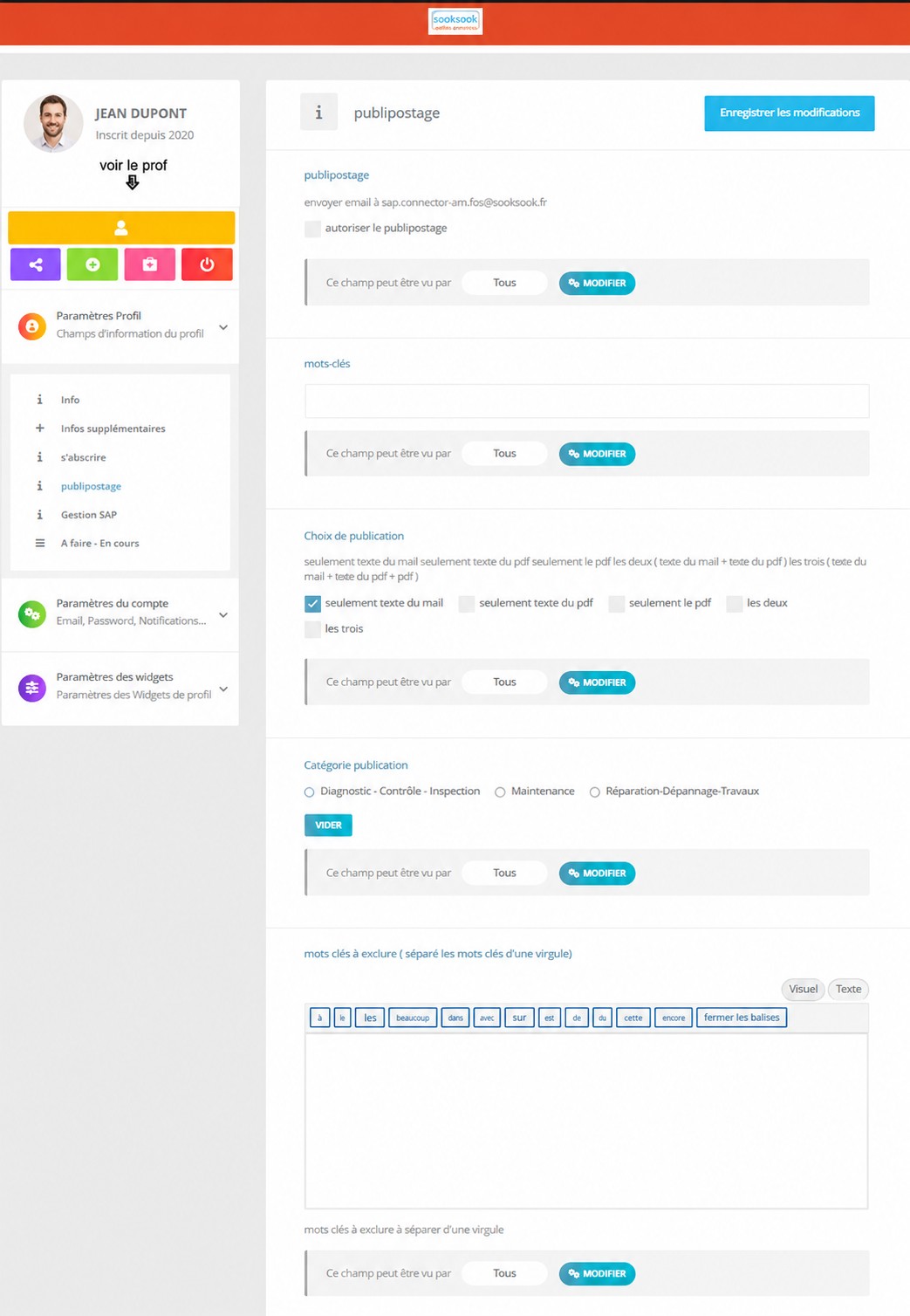 The functionalityPublipostageis used to automatically send information by email from a SookSook publication.
Concretely, when a user publishes information on a profile, for example a machine, equipment or installation, this function allows the content to be sent to the people concerned.
What is it for
It allows you to transform a SookSook publication intoautomatic information message.
Examples of use:
- inform that equipment isreturned to service ;
- warn of ainstallation shutdown ;
- report atroubleshooting in progress ;
- broadcast amaintenance report ;
- send asafety information ;
- warn of ascheduled intervention ;
- communicate adiagnosis, control or inspection ;
- share a post with a profile’s followers.
Simple example
A technician publishes on the profile:
“FB-40 distributor returned to service after intervention.”
With direct mail, this information can be automatically sent by email to the relevant people: maintenance, operations, security, users, external companies, etc.
Role of settings visible on the page
Allow mail merge
Allows you to activate or not the automatic sending of emails.
Keywords
Allows you to target certain publications based on the words present in the content.
Example: “restart”, “failure”, “maintenance”, “stop”.
Publication choice
Allows you to choose what is sent:
- only the text of the email;
- only the text of the PDF;
- only the PDF;
- both ;
- or all of the elements.
Publication category
Allows you to filter the types of publications to send:
- Diagnosis / Control / Inspection;
- Maintenance;
- Repair / Troubleshooting / Work.
Negative keywords
Allows you to avoid sending certain unnecessary or unrelated publications.
The advantages
This feature avoids having to redo the same message several times by email.
The user posts once on SookSook, then the information can be automatically distributed to the right people.
Above all, it provides:
- saving time;
- better dissemination of information;
- fewer forgettings;
- better traceability;
- clearer communication between field, maintenance and operations;
- centralized information on the profile concerned;
- a quick alert for subscribed people.
The pagepublipostageallows you to configure the automation of distribution of publications carried out inSookSook.
This feature is used to:
- automatically send emails,
- broadcast notifications,
- transmit publications,
- alert contacts,
- automate field/office communication.
1. Purpose of direct mail
Direct mail transforms a field publication into automatic communication.
Exemple
When an agent posts:
- a moment of security,
- a report,
- a breakdown,
- a diagnosis,
- an intervention,
the system can automatically:
- send an email,
- notify subscribers,
- broadcast to a contact list,
- transmit to those responsible,
- feed a workflow.
2. “Subject” field
The field:
publipostageallows you to define the subject used in automatic emails.
Possible example
| Publication | Generated topic |
|---|---|
| Safety moment | safety intervention |
| Machine breakdown | equipment alert |
| Rapport | intervention report |
3. Email Template
The area:
email templateallows you to personalize the content of messages sent automatically.
This allows:
- to add a personalized text,
- insert field information,
- adapt the tone of notifications,
- structure automatic newsletters.
4. Choice of publications concerned
The section:
Choice of publicationsallows you to define which posts trigger automations.
Examples of publications
| Type | Fonction |
|---|---|
| Diagnostic | technical notification |
| Control | security monitoring |
| Inspection | HSE distribution |
| Maintenance | historique |
| Repair, troubleshooting work | operational alert |
5. Filtering by categories
The user can select the relevant categories.
Visible example
| Category | Utility |
|---|---|
| Diagnostic | expertise |
| Control | security |
| Inspection | compliance |
| Maintenance | machine tracking |
| Repair, troubleshooting work | interventions |
6. Choice of recipients
The system allows you to define who to automatically send publications to.
Exemples
| Destinataire | Utility |
|---|---|
| Responsable | supervision |
| Team | coordination |
| Sous-traitant | site monitoring |
| Maintenance | intervention |
| HSE | prevention |
| SAP/ERP | integration |
7. Delivery methods
Direct mail can:
- sending e-mail,
- newsletters,
- automatic notifications,
- publication workflows,
- transmissions to external systems.
8. Personalization of messages
The large text box allows:
- add personalized content,
- insert instructions,
- add security information,
- structure the message sent.
Exemple
A field publication can automatically generate:
- the title,
- the author,
- the machine,
- the risks,
- PPE,
- the photos,
- the attached documents.
9. “EDIT” button
The button:
MODIFIERallow :
- to change the visibility rules,
- manage access,
- secure settings.
10. Saving settings
The button:
Save changesbackup:
- automation rules,
- filters,
- email templates,
- the selected categories.
11. Field and office utility
Direct mail connects:
| Terrain | Bureau |
|---|---|
| Publication | Notification |
| Intervention | Information |
| Security | Supervision |
| Rapport | Historique |
| Machine | Alerte |
| Agent | Communication |
12. Concrete example
Elevator technician
When he publishes:
Elevator safety momentSookSook can automatically:
- send an email to those responsible,
- notify subscribers,
- transmit to the teams,
- archive the publication,
- integrate the data into the history.
13. Vision SookSook
Dans SookSook, direct mail transforms:
a simple field publication
en
automated and traceable information flow.
14. System Philosophy
Direct mail allows:
- rapid communication,
- better responsiveness,
- structured distribution,
- real-time supervision,
- continuity between field and office.
Each publication can thus become:
- an alert,
- a newsletter,
- a notification,
- a proof,
- an operational monitoring element.