
sooksook-E-learning
Affiliate module 19 Sections170 LessonsDurée de vie
To do – In progress
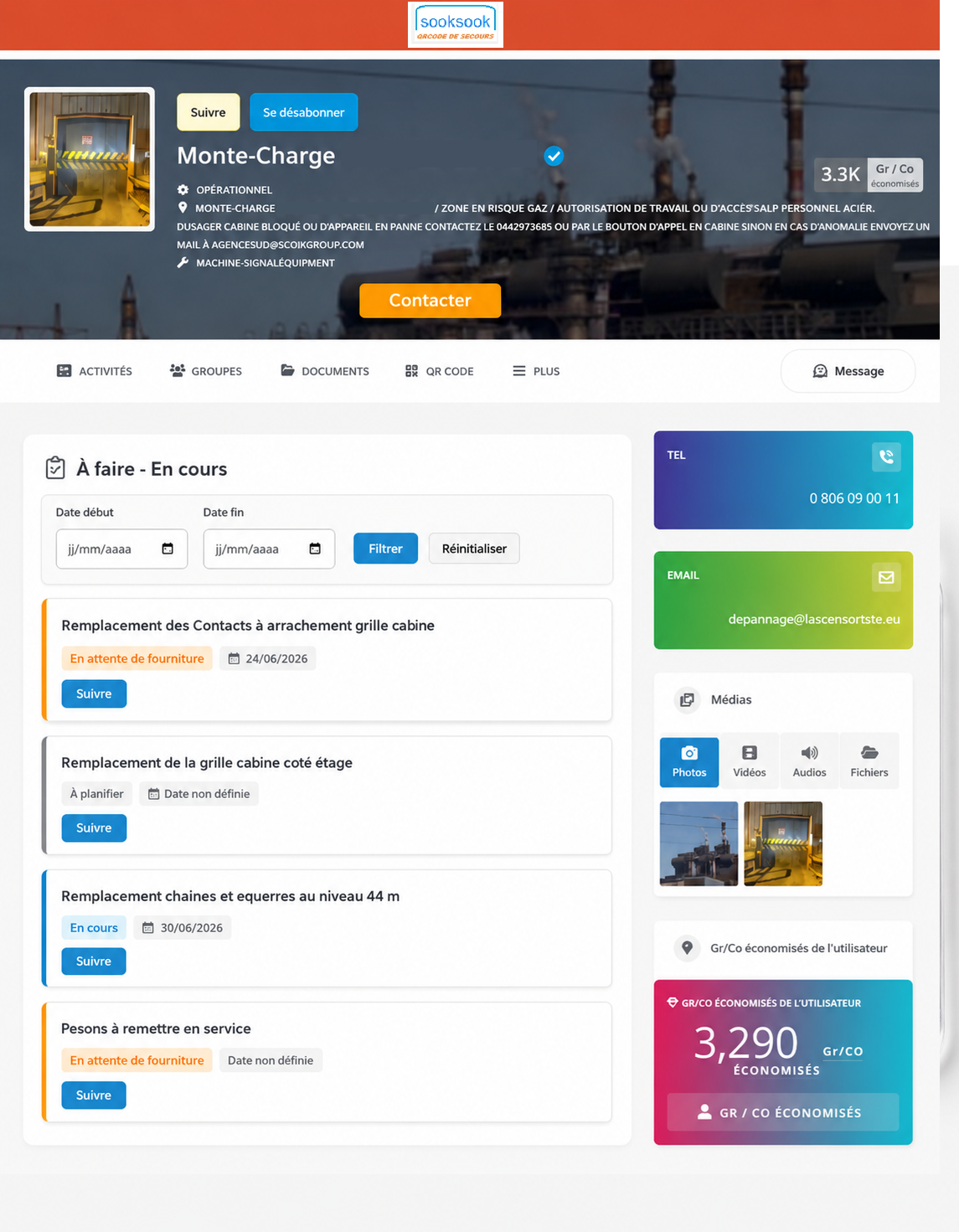 The tab“À faire – En cours”allows you to track actions, requests, work or important points linked to a user profile.
It serves to centralize what needs to be done, what is in progress, what is pending and what is completed.
The objective is simple: to avoid oversights, better monitor progress and allow other users to quickly consult the status of actions in progress.
What can we see in this tab
For each to-do, you can see:
- the name of the action to be carried out;
- its status;
- an associated date;
- a button to follow the progress of this action.
The possible statuses are:
To plan
The action has been identified, but it has not yet been scheduled.
In progress
The action is currently being processed.
Waiting for supply
The action is blocked or waiting for material, part, document or information.
Soldé – Terminé
The action is finished.
How to add a to do
Creating or modifying things to do is done from the user profile modification page.
In the field“À faire – En cours”, the user can add a new line with the buttonAdd.
Example :
Replace the safety contact Check the cabin grille Plan for elevator interventionFor each line, it is possible to add:
a status a dateThen you have to click onSave changesto save.
How to delete a to-do
In the profile edit page, each line has a buttonSupprimer.
By clicking on it, the line is hidden and then deleted when the profile is saved.
You should therefore remember to then click on:
Save changesHow to view a profile's to-do's
From a user's public profile, open the tab:
To do - In progressYou will see the list of actions with their status and date.
The colors allow you to quickly understand the status of each action:
To be planned: gray In progress: blue Awaiting supply: orange Sale - Completed: greenHow to filter by date
On the public profile, a filter allows you to search for actions over a specific period.
You can select:
Start date End dateThen click onFiltrer.
To return to the full list, clickReset.
What is the “Follow” button for?
The buttonSuivreallows you to receive an email notification when an action changes.
If you click onSuivre, you will be automatically notified if:
status changes date changesExample :
In progress → Sale - CompletedOr :
Expected date: 06/12/2026 → 06/15/2026You will then receive an email with details of the modification.
Who can use the “Follow” button
The buttonSuivreis only displayed for logged in users with a valid email address on their account.
Visitors who are not logged in can view information, but cannot follow an action.
How to stop following an action
If you are already following an action, the button becomes:
UnfollowBy clicking on it, you will no longer receive notifications for this line.
Example of use
A profile contains the following actions:
Safety contact check Status: In progress Date: 06/12/2026 Part replacement Status: Awaiting supply Date: 06/18/2026 Tests after intervention Status: To be planned Date: 06/20/2026Another user can view progress, filter by date and follow an action to be automatically informed if there is a change.