
sooksook-E-learning
Affiliate module 19 Sections170 LessonsDurée de vie
Zone
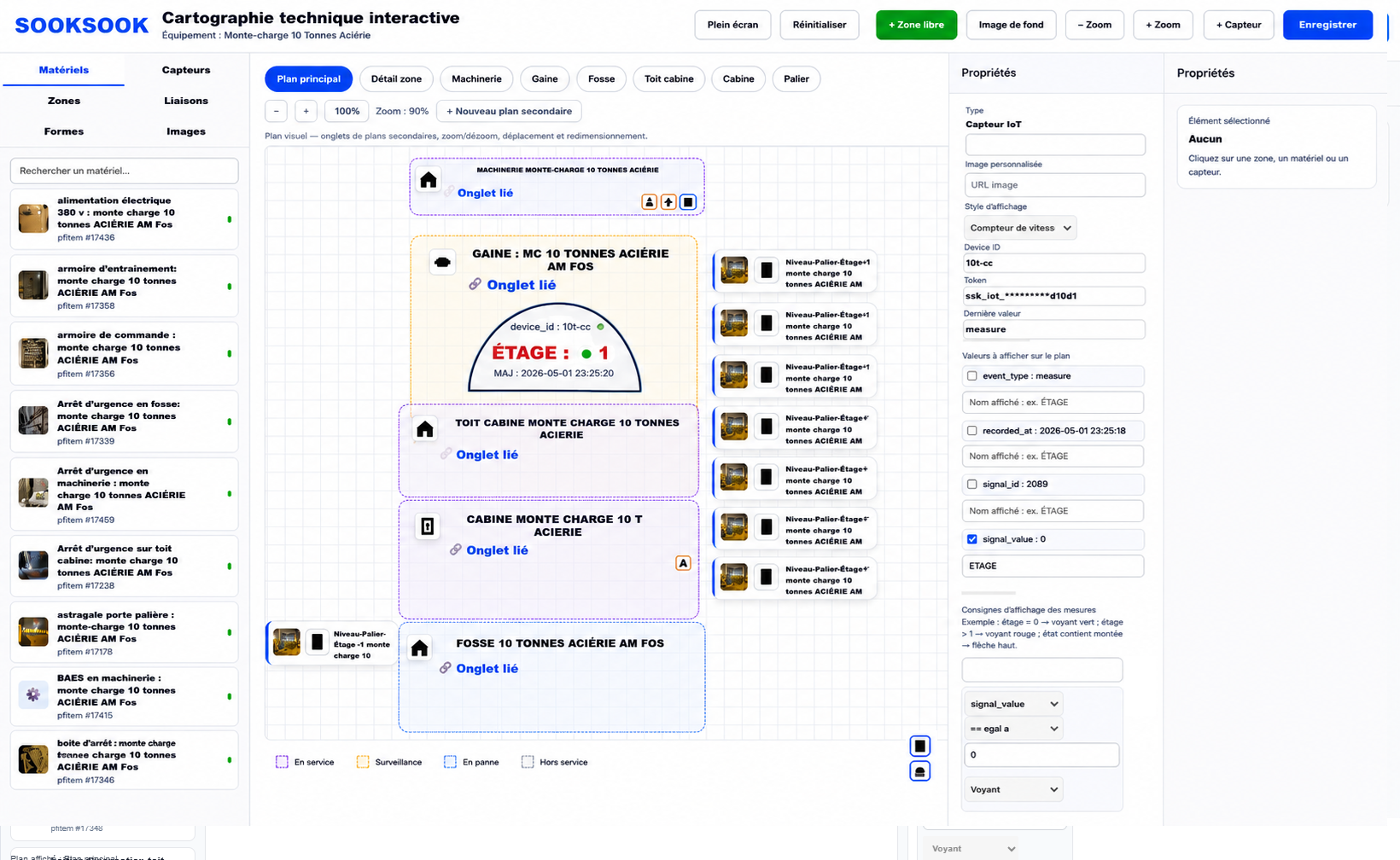
The moduleZonesof interactive technical mapping SookSook allows you to create intelligent spaces directly on the plan of equipment, an installation, a construction site or a machine.
These areas are used to visually structure the technical environment in order to improve:
- understanding the installations;
- the location of terrain elements;
- risk identification;
- the safety of interventions;
- traceability;
- operational monitoring;
- preparation of work;
- and communication between stakeholders.
A zone can be created:
- directly from the interactive cartography;
- or automatically linked to a PFItem published on the platform.
This makes it possible to transform a simple field publication into a real interactive technical zone.
Creating a zone
The user can create a zone directly on the plan using the button:
- “Free zone”
or from an existing PFItem published on SookSook.
A zone can represent for example:
- machinery;
- a sheath;
- a cabin;
- a landing;
- a pit;
- a roof;
- an electrical cabinet;
- an ATEX zone;
- a technical room;
- a maintenance area;
- a danger perimeter;
- secure access;
- a temporary construction site area;
- a storage area;
- or any other custom area.
Configurable information in an area
1. Zone name
Each zone can receive a personalized name:
Examples:
- Main machinery
- Lockout area
- Cabin roof
- Level landing 32 m
- No access zone
- Dimmer room
- Hydraulic maintenance area
The name allows the area to be immediately identified on the map.
2. Area color
Each area can be personalized with a color to improve visual reading.
Examples of use:
- Red → immediate danger
- Orange → alertness
- Yellow → maintenance
- Green → secure area
- Blue → circulation
- Purple → supervision
- Gray → out of service
Colors allow a quick understanding of the status or function of the area.
3. Shape of the area
The zones can have different shapes:
- rectangle ;
- square ;
- circle ;
- ellipsis;
- free form;
- polygon;
- corridor ;
- technical line;
- custom perimeter.
This makes it possible to precisely adapt the mapping to the reality on the ground.
Example :
- a vertical sheath;
- a circulation corridor;
- a temporary work area;
- a security perimeter;
- a sloping roof;
- a complex machine area.
4. Size and positioning
Each zone can be:
- displaced;
- resized;
- superimposed;
- aligned;
- organized by levels;
- linked to different secondary plans.
The user can thus create a very detailed multi-level map.
5.Linking with a published PFItem
6. Risk management
Each zone can integrate security and prevention information.
Examples:
- electrical risk;
- fall from height;
- mechanical risk;
- hydraulic risk;
- risk of crushing;
- ATEX zone;
- high temperature;
- machinery circulation;
- confined space;
- working at height;
- presence of asbestos;
- mandatory deposit.
This information makes it possible to improve:
- the safety moment;
- preparation of interventions;
- field prevention;
- hazard analysis.
7. PPE management
Each zone can define the mandatory PPE.
Examples:
- helmet ;
- harness;
- gloves ;
- glasses ;
- hearing protection;
- respiratory mask;
- safety shoes;
- gas detector;
- visor;
- fire protection.
When a user views the area, the required PPE can be displayed automatically.
This allows:
- improve security;
- to reduce forgetfulness;
- to harmonize practices;
- to strengthen prevention.
8. Adding images and technical backgrounds
A zone can contain:
- photos;
- plans;
- diagrams;
- technical views;
- tracking images;
- synoptics;
- field captures.
These elements facilitate:
- location;
- diagnosis;
- understanding the installations.
9. Link with IoT sensors
A zone can be linked to:
- sensors;
- measurements;
- real-time values;
- machine states;
- alerts.
Examples:
- temperature ;
- level ;
- cabin floor;
- emergency stop state;
- machine fault;
- presence of tension;
- vibration;
- humidity.
Information can be displayed directly on the plan.
10. Multi-level interactive zones
The system also allows:
- zone tabs;
- secondary plans;
- sub-zones;
- detailed views.
Example :
Main plan → Machinery → Cabinet → Drive → IoT sensor
This allows very advanced technical navigation.
Objective of the Zones module
The Zones module transforms a simple static plan into:
- intelligent technical mapping;
- supervision interface;
- prevention support;
- field communication tool;
- operational monitoring system;
- interactive documentary portal;
- IoT interface;
- traceability and analysis tool.
It thus makes it possible to centralize:
- equipment;
- risks;
- documents;
- interventions;
- measurements;
- PPE;
- reports;
- historical ones;
- and field information in a single interactive visual interface.