
sooksook-E-learning
Affiliate module 19 Sections170 LessonsDurée de vie
Profile – Info
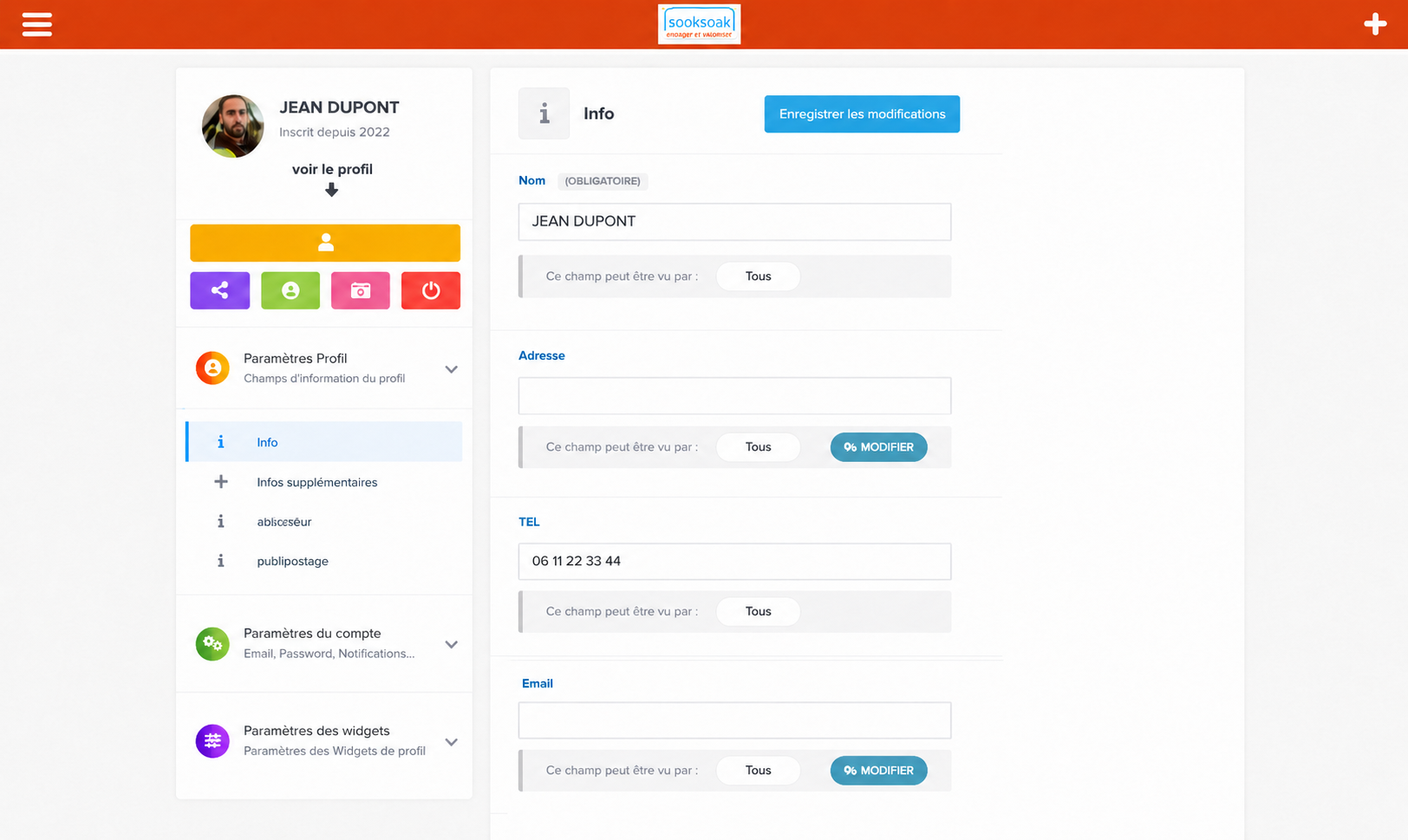
The profile settings page allows each user to manage their personal information, visibility settings and preferences in the ecosystemSookSook.
This page is mainly intended for typical members:
- agents,
- technicians,
- speakers,
- managers,
- subcontractors,
- field users.
1. Page Purpose
This interface allows:
- to manage your digital identity,
- to modify their information,
- to control the visibility of data,
- to personalize your profile,
- to manage your account settings,
- to administer its widgets and displays.
2. User profile part
The left column displays:
| Element | Fonction |
|---|---|
| Profile picture | user identification |
| Nom | identity displayed |
| Registration date | user history |
| View profile | access to public profile |
3. Quick buttons
Below the profile are several quick shortcuts.
Share button
Allow :
- share profile,
- distribute a link,
- transmit public access.
Profile button
Allow :
- quickly access the public profile,
- check the user display.
Photo/avatar button
Allow :
- change profile picture,
- personalize the visual identity.
Disconnect button
Allow :
- secure the account,
- close the user session.
4. Profile Settings
The section:
Profile Settingsallows you to manage the information fields visible on the profile.
5. Editable information
The user can modify:
| Champ | Utility |
|---|---|
| Nom | identify |
| Adresse | localisation |
| Phone | contact |
| notifications | |
| Additional information | detailed profile |
6. Visibility management
Each field has a confidentiality system:
This field can be seen byExamples of visibility
| Mode | Fonction |
|---|---|
| Tous | publicly visible |
| Members only | reserved connected users |
| Me only | private |
| Specific groups | limited access |
7. Control of sensitive data
This management makes it possible to protect:
- phone number,
- e-mail,
- address,
- personal data,
- professional information.
8. Saving Changes
The button:
Save changesallow :
- to save the changes,
- update profile,
- update public information.
9. Additional information
The section:
Additional informationmay contain:
- job,
- SKILLS,
- authorizations,
- qualifications,
- experience,
- technical specialties.
10. Account Settings
The part:
Account settingsallows you to manage:
- password,
- e-mail,
- notifications,
- account security,
- user preferences.
11. Widget Settings
The section:
Widget settingsallows you to personalize the profile display.
Vision SookSook
Dans SookSook, the profile is not just a classic user file.
It becomes:
- an operational identity,
- a professional profile,
- a field history,
- traceability support,
- a skills card,
- a communication tool.
13. Field utility
This page allows agents to:
| Fonction | Utility |
|---|---|
| Update their data | communication |
| Control their visibility | confidentiality |
| Manage their business information | organisation |
| Personalize their profile | identification |
| Secure their account | access protection |